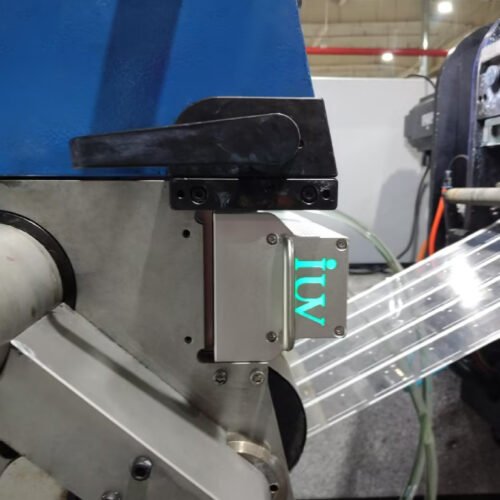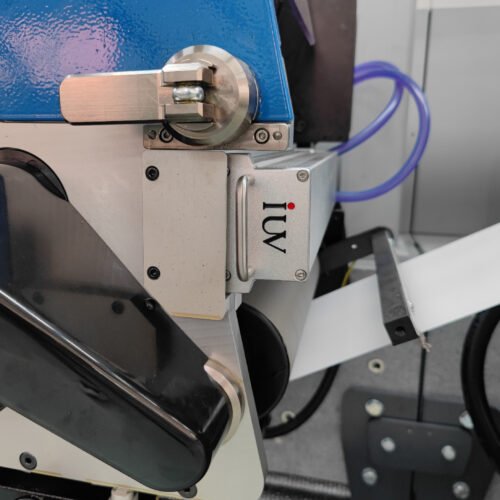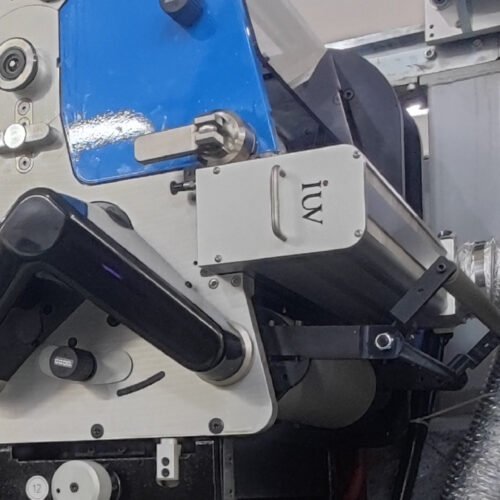
Undercuring is a common concern in flexographic label printing, especially when production speeds increase or printing conditions change. Ink that has not cured properly may show poor adhesion, low rub resistance, surface tack or problems during downstream converting. These defects can affect product quality and lead to waste.
Preventing undercuring with UV LED curing systems requires the right balance between irradiance, press speed, ink formulation and substrate properties. Increasing UV output alone does not always solve the problem. The selected wavelength must match the ink, and the curing system must deliver enough UV energy under actual production conditions.
This article explains how to identify undercuring, establish suitable irradiance and press speed settings, and troubleshoot common curing problems in flexographic label printing. It also covers practical testing methods, equipment maintenance and the conditions that help maintain consistent curing during production.
Introduction
Flexographic printing is widely used for pressure-sensitive labels, film labels and other narrow web products. The process often involves several colour stations, followed by varnishing, die-cutting or other finishing operations. Each printed layer must reach the required level of cure to maintain reliable performance.
UV LED curing systems provide controlled UV output and can switch on and off quickly. They are also useful for applications where reducing heat exposure is important. However, curing performance depends on the complete printing process, not only on the curing equipment.
When a press runs faster, the printed ink spends less time beneath the LED curing head. If the available UV energy is insufficient, the ink may remain partially uncured. Similar problems can occur after changing ink brands, switching substrates, adjusting the anilox roll or increasing ink coverage.
The practical goal is to establish a reliable operating window in which the ink cures properly at the required production speed. This requires suitable equipment settings, consistent printing conditions and simple tests that can confirm curing performance.
1. Recognising Undercuring in Flexographic Printing
Undercuring does not always produce an obvious visual defect. A printed label may look clean and dry while the ink still lacks the required resistance or adhesion.
Common signs include ink transferring during rubbing, poor adhesion to the substrate, surface tack and scratches appearing too easily. In some cases, ink may lift during die-cutting, rewinding or subsequent converting operations. These symptoms can also have other causes, so they should be investigated rather than treated as proof of undercuring.
The location of the defect can help narrow down the cause. If only one colour shows poor resistance, the ink formulation, ink deposit and curing conditions at that station deserve attention. If several colours show similar problems, engineers should also check shared factors such as press speed, LED output and cooling performance.
Undercuring may also become more noticeable after a production change. A job that performs well at a moderate speed may develop defects when the operator increases the line speed. A new substrate or ink batch may also change the results.
A reliable assessment should combine visual inspection with appropriate performance tests. Depending on the application, these may include rub resistance, adhesion and checks after downstream converting. The acceptance criteria should be agreed upon before production trials begin.
2. Understanding Irradiance and UV Energy
Irradiance is the amount of UV power reaching a surface at a given moment. It is commonly expressed in watts per square centimetre or milliwatts per square centimetre. Radiant exposure describes the UV energy accumulated over the exposure period and is commonly expressed in joules per square centimetre.
Both are important when setting up an LED UV curing system. Irradiance indicates the intensity of the UV radiation, while radiant exposure helps describe how much energy reaches the printed ink as the web passes beneath the curing head.
When the press speed increases, exposure time decreases. If the irradiance remains unchanged, the printed ink generally receives less total UV energy during its passage through the curing area.
However, curing is not determined by total energy alone. The ink’s photoinitiator system, wavelength compatibility, pigment content and film thickness all influence the result. Two curing setups that deliver similar total energy may not produce identical results.
For this reason, operators should not rely on a single irradiance reading or assume that a particular output percentage guarantees complete curing. Settings should be checked against the ink manufacturer’s recommendations and confirmed through tests on the actual substrate.
3. How to Set Irradiance and Press Speed
The starting point is to identify the curing conditions recommended for the selected LED-curable ink. The ink supplier should confirm the suitable wavelength range and provide guidance on curing requirements for the intended application.
Next, confirm the curing system’s output and the press’s normal operating speed. If the job already runs successfully, record its current settings as a reference. These may include line speed, LED output setting, ink type, substrate and printing conditions.
When testing a new job, begin at a manageable production speed with a suitable output setting. Inspect the printed samples and perform the agreed curing tests. If the results are acceptable, increase the press speed in controlled steps.
At each step, check whether adhesion, rub resistance and other required properties remain consistent. If performance deteriorates as the speed increases, return to the last acceptable setting and investigate the reason before continuing.
The curing controller may use a speed signal to adjust UV output automatically. This can help maintain consistent operation during normal speed changes. However, automatic adjustment must be based on a tested relationship between speed and curing requirements.
There is no universal output setting that suits every flexographic job. A thin film with a light ink deposit may behave differently from a label with dense colours or opaque white ink. The operating window should be established for the actual combination of ink, substrate and production conditions.
4. Choosing the Correct LED UV Wavelength
Wavelength compatibility is one of the first factors to check when undercuring occurs. LED UV curing systems commonly operate at wavelengths such as 365 nm, 385 nm and 395 nm. The suitable option depends on the ink formulation.
UV-curable inks contain photoinitiators that absorb UV radiation and start the curing reaction. If the LED wavelength does not match the photoinitiator system adequately, curing may remain poor even when the displayed output is high.
This issue can arise when a printer changes from conventional UV curing to LED UV curing. Existing inks may not be designed for the new light source. A suitable LED-curable ink may be needed to achieve the required result.
Pigmented inks also require attention. White, opaque and heavily coloured inks can be more difficult to cure because pigments may absorb or scatter UV radiation. The ink film’s lower layers may receive less energy than the surface.
Before changing the LED output, confirm that the ink is suitable for the installed wavelength. If the wavelength is correct but the ink still fails testing, review the ink deposit, production speed and curing system condition.
5. Controlling Ink Film Thickness with the Anilox Roll
In flexographic printing, the anilox roll controls how much ink reaches the printing plate. Its cell volume, condition and suitability for the job influence the final ink film on the substrate.
A thicker ink film may require more UV energy to cure properly. This is particularly relevant for solid areas, dense colours and opaque white inks. If the deposited ink exceeds the intended amount, the curing system may struggle to maintain the required results at higher speeds.
When undercuring occurs, check whether the anilox specification matches the ink and print coverage. Inspect the roll for contamination, wear or blocked cells that could affect ink transfer. Also review ink viscosity and printing pressure.
Increasing UV output without checking ink transfer may hide the real problem. It can also create unnecessary operating costs if the ink deposit is outside the intended process range.
Consistent ink transfer makes curing easier to control. Once the printing conditions are stable, engineers can establish more reliable irradiance and speed settings for repeat production.
6. Considering Substrate Type and Heat Sensitivity
The substrate can affect both curing performance and final label quality. Common narrow web materials include paper, polypropylene, polyethylene and polyester films. Their surface properties, thickness and heat sensitivity vary.
Poor adhesion is not always caused by insufficient UV energy. Some films may have low surface energy or inadequate surface treatment, making it difficult for ink to bond properly. Dust, oil or other contamination can also interfere with adhesion.
Engineers should check whether the ink is suitable for the selected substrate. If adhesion remains poor, confirm the substrate’s surface condition and treatment level before increasing UV output.
Heat-sensitive films require additional care. Although LED UV systems can reduce some heat transfer compared with conventional curing arrangements, they still generate heat. The amount depends on the equipment, output setting, cooling performance and production speed.
If the film shrinks or registration changes during printing, inspect both the curing conditions and the web handling system. Stable tension and suitable temperature control help maintain print registration and reduce downstream converting problems.
7. Preventing Surface Tack and Oxygen Inhibition
Surface tack can indicate undercuring, but the cause may involve the ink formulation and the surrounding environment. In some UV-curable inks and coatings, oxygen interferes with the curing reaction at the exposed surface. This is known as oxygen inhibition.
When oxygen inhibition occurs, the surface may remain tacky even if the ink has cured more effectively beneath it. Simply increasing the LED output may not fully resolve the issue.
The first step is to confirm that the ink is designed for the selected LED wavelength and that the curing system is operating correctly. The ink supplier can then advise whether the formulation is suitable for the application and whether any approved process changes are needed.
Testing should distinguish between surface condition and overall curing performance. A surface that feels dry does not automatically mean the entire ink film is adequately cured. Similarly, a tacky surface does not always indicate that every part of the film is undercured.
For demanding applications, use the relevant adhesion, rub resistance and downstream performance tests. These checks provide a clearer basis for deciding whether the problem is related to UV settings, ink chemistry or another production factor.
8. Maintaining Consistent Curing During Speed Changes
Flexographic presses frequently accelerate and decelerate during setup and production. If the curing system does not respond appropriately, the available UV energy may vary as the web speed changes.
A speed-linked output function can help maintain stable curing conditions. The controller receives the press speed and adjusts the requested UV output according to a predefined setting.
However, the output should not be increased without limits. The curing head, LED drivers and cooling system have specified operating ranges. The selected control function must remain within these limits and should be validated with the intended inks.
Press stops also require a defined response. When the web stops, the curing system should follow the agreed control sequence to prevent stationary material from receiving an unsuitable exposure. Cooling faults and communication failures should trigger the appropriate protective response.
During commissioning, engineers should test normal acceleration, deceleration and stop conditions. They should also verify that the system responds correctly if the speed signal is lost.
These checks help reduce curing variations during production transitions and make the equipment easier for operators to manage.
9. Troubleshooting Common Undercuring Problems
A structured troubleshooting process can help identify the cause without changing several settings at once.
Undercuring at higher press speeds: Check whether the output follows the speed signal correctly. Confirm that the current speed is within the validated operating range and that the ink receives sufficient UV energy.
Poor curing of white or dense colours: Review the ink formulation, wavelength compatibility and ink film thickness. Check whether the selected ink is suitable for the curing system.
Poor adhesion on film substrates: Check surface treatment, cleanliness and ink compatibility. Do not assume that increasing irradiance will solve a substrate-related problem.
Tacky ink after curing: Check the wavelength, output setting and ink recommendations. If the problem persists, ask the ink supplier to assess possible oxygen inhibition or formulation issues.
Uneven curing across the web: Inspect the curing head for contamination and alignment problems. Check UV output across the usable web width and confirm that ink coverage is consistent.
Curing performance changes over time: Inspect the optical surfaces, cooling system and electrical connections. Compare current measurements with the original commissioning records.
The key is to confirm the cause before making a permanent adjustment. This helps maintain consistent results and avoids unnecessary changes to a stable production process.
10. Equipment Maintenance and Output Verification
Even a correctly installed LED UV curing system can experience changes in performance if maintenance is neglected. Dust, ink mist and coating residue may accumulate around the curing head and reduce the UV energy reaching the substrate.
Optical surfaces should be inspected and cleaned according to the equipment manufacturer’s instructions. Cleaning materials and methods must be suitable for the installed components.
For water-cooled systems, check coolant flow, inlet temperature and signs of leakage. Restricted flow or poor heat removal can cause the system to overheat or reduce its ability to maintain stable operation.
Periodic irradiance measurements can help identify changes before they lead to visible defects. Use a suitable instrument and repeat measurements under comparable conditions. The measurement position, operating settings and relevant wavelength range should be recorded.
Operators should also maintain production records for line speed, ink type, substrate and UV settings. These records make it easier to compare jobs and investigate changes in curing performance.
If a previously stable job begins to fail, engineers can review the records to determine whether the problem follows a change in materials, press settings or equipment condition.
11. Establishing a Practical Curing Validation Process
A clear validation process helps printers confirm that irradiance and press speed settings are suitable for regular production.
Start by selecting representative jobs and documenting their ink, substrate and printing conditions. Confirm the LED wavelength and establish the initial output and speed settings using the ink supplier’s guidance.
Run the press at several speeds and collect samples under controlled conditions. Evaluate the samples using the agreed tests for adhesion, rub resistance and other application requirements. Record the results alongside the operating settings.
Include challenging jobs in the validation process. Dense colours, opaque white inks, heavier ink deposits and heat-sensitive substrates may require particular attention.
If the system uses automatic speed-linked output control, confirm that the selected settings provide acceptable results throughout the intended operating range. Test speed transitions and stop sequences as well.
The final production settings should be documented and shared with operators. If the ink, substrate or printing conditions change significantly, repeat the relevant checks before releasing the updated job for full production.
Conclusion
Preventing undercuring in flexographic printing with UV LED systems requires the right balance between irradiance, press speed, ink formulation and substrate properties. Increasing output alone is not always sufficient. Wavelength compatibility, ink film thickness and the condition of the curing equipment must also be considered.
A reliable setup begins with suitable ink selection and stable printing conditions. Engineers should establish the operating range through controlled production tests, then verify that curing performance remains acceptable as the press speed changes.
Regular maintenance, output measurements and clear production records help preserve this operating range over time. By following a structured approach, OEMs and end users can reduce curing-related defects, improve production consistency and maintain reliable quality in flexographic label printing.